
Graphics Cards vs. Integrated Graphics: What’s the Difference and Why Does it Matter?
When you’re looking at a new computer, whether it’s for gaming, video editing, or just everyday tasks, you’ll inevitably come across terms like “graphics card” and “integrated graphics.” These terms refer to how your computer handles the visual output you see on your screen. While both achieve the goal of putting images on your monitor, they do so in fundamentally different ways, with significant implications for performance and cost.
Let’s break down the core differences.
Integrated Graphics: The Built-In Solution
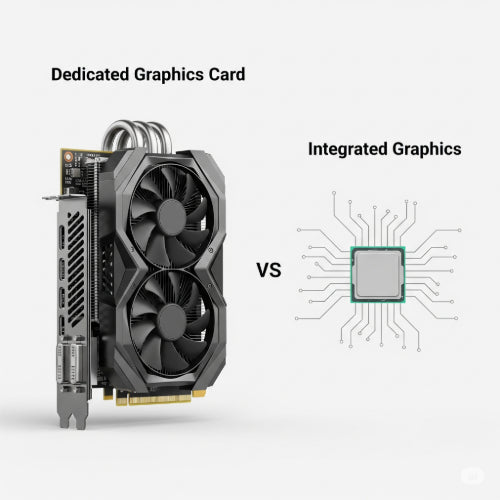
What it is: Integrated graphics (often referred to as iGPU or onboard graphics) are graphics processing units (GPUs) that are built directly into the computer's main processor (CPU) or the motherboard's chipset. Instead of having its own dedicated memory, an iGPU shares the computer's main system RAM for its graphical operations.
Pros:
- Cost-Effective: Because they're part of the CPU or motherboard, they don't add significant extra cost to the system. This makes them ideal for budget-friendly computers.
- Power Efficient: Integrated graphics consume less power than dedicated graphics cards, leading to longer battery life in laptops and lower electricity bills for desktops.
- Compact: Their integrated nature means they take up no extra physical space, which is crucial for thin and light laptops and compact desktop PCs.
- Sufficient for Everyday Tasks: For web Browse, word processing, streaming videos, social media, and light photo editing, integrated graphics perform perfectly well.
Cons:
- Limited Performance: Sharing system RAM means less memory is available for complex graphical tasks, and the memory bandwidth is often a bottleneck. This limits their ability to handle demanding games, professional video editing, or 3D rendering.
- Lower Graphical Fidelity: You won't be able to run games at high resolutions or with advanced graphical settings.
- Not Upgradeable: Since they're integrated into the CPU or motherboard, you cannot upgrade integrated graphics independently. You'd need to replace the entire CPU/motherboard.
Dedicated Graphics Cards: The Powerhouse Performer
What it is: A dedicated graphics card (also known as a discrete graphics card or GPU) is a separate, independent component that plugs into your computer's motherboard. It has its own dedicated memory (VRAM – Video Random Access Memory) and its own powerful graphics processing unit, specifically designed to handle complex visual calculations.
Pros:
- Superior Performance: Dedicated GPUs are built for heavy lifting. They excel at rendering high-resolution graphics, complex 3D environments, and accelerating demanding applications.
- Dedicated Memory (VRAM): Having their own fast memory means they don't compete with the CPU for system RAM, allowing for much faster and more efficient graphics processing.
- Ideal for Demanding Tasks: If you're into serious gaming (especially at high resolutions or refresh rates), video editing (4K or higher), 3D modeling, graphic design, AI/machine learning development, or cryptocurrency mining, a dedicated graphics card is essential.
- Upgradeable: In most desktop PCs, you can upgrade your graphics card independently to improve performance as new models become available or your needs change.
Cons:
- Higher Cost: Dedicated graphics cards, particularly high-end models, can be very expensive, often being the most costly single component in a computer.
- Higher Power Consumption: They require more power, which can mean a larger power supply for desktops and reduced battery life for gaming laptops.
- Generates More Heat: More power consumption means more heat, requiring robust cooling solutions.
- Physical Size: Dedicated graphics cards can be large and bulky, requiring more space in a computer case.
Which One Do You Need?
The choice between integrated and dedicated graphics boils down to your primary use case:
- Choose Integrated Graphics if: You primarily use your computer for everyday tasks like web Browse, email, word processing, video streaming, and light photo editing. You value affordability, portability (for laptops), and energy efficiency.
- Choose a Dedicated Graphics Card if: You are a serious gamer, professional content creator (video editor, 3D artist), engineer using CAD software, or involved in scientific computing or AI development. You need maximum graphical performance and are willing to invest in it.
In summary, integrated graphics offer a practical and cost-effective solution for everyday computing, while dedicated graphics cards provide the raw power needed for demanding visual applications and the ultimate gaming experience. Understanding this fundamental difference will help you make an informed decision when choosing your next computer.





